Amazon has launched a Kindle Publishing for Blogs program. So now, bloggers can sign up and upload their blogs or any RSS feeds for sale in the Kindle Store and this facility is available to all the bloggers worldwide. Do not worry if you do not have a Kindle device to test the layout of your blog on the e-ink screen. Amazon has a preview feature for you to see how the feed will appear on the Kindle screen .This is awesome! :)
To get started is actually a breeze:
• You’ve got to create a separate account for the program. Your existing Amazon or Kindle account is not enough.
• You have to provide your contact details, your payment info including your tax ID number and bank account specification.
• International publishers will also be able to receive their payments via a U.S. check.
Once you have a Kindle Publishing account, you will have to make available your blog’s RSS feed, an account of your blog details, the screen shot image of your blog's home page, your blog category and the banner or logo of your blog. Preview your blog submission , press Publish and that's it! Your blog has been submitted! Once Amazon approves your blog, the blog will be published with in 48-72 hours and it will be available to Kindle users on the Amazon Store and the Amazon Associates, where customers can view your blog and subscribe for it, if they like it!
How much can you earn? Well, Amazon fixes the rate for the blog, which is usually $0.99 per month, while some top blogs can draw upto $1.99 per month. Amazon will share 30% subscription revenue with you. There is no way you can distribute your blog for free, either.Moreover, Kindle provides its subscribers the full blog articles and just not excerpts. Subscribers can read the blogs even while offline. Kindle blogs are auto-delivered wirelessly to the Kindle and updated throughout the day.
Well..you can chew on this project, but remember that though you might not make a lot of money from the Kindle, your blog will get more exposure and it widens the reach of your blog as well! Happy blogging at Kindle!
Copyright © 2009 Laila Rajaratnam. All Rights Reserved
Read more Entry>>
Tuesday, June 9, 2009


Monday, June 8, 2009
Amazon Kindle DX
Amazon Kindle is a wireless and portable electronic reading device. It’s the new way of reading books on the go! It's electronic-paper display, looks like a real newspaper and it has a sharp, high-resolution screen.
Carry Your Library: Holds up to 3,500 books, periodicals, and documents
Built-In PDF Reader: Native PDF support allows you to carry and read all of your personal and professional documents on the go
Wireless: 3G wireless lets you download books right from your Kindle DX, anytime, anywhere; no monthly fees, no annual contracts, and no hunting for Wi-Fi hotspots
Books In Under 60 Seconds: You get free wireless delivery of books in less than 60 seconds; no PC required
Long Battery Life: Read for days without recharging
Kindle DX has a text-to-speech feature and Kindle DX can read newspapers, magazines, blogs, and books out loud to you, unless the book's rights holder made the feature unavailable
Over 285,000 books, New York Times Best Sellers and New Releases and U.S. and international newspapers including the New York Times and Wall Street Journal, magazines including The New Yorker and Time, plus popular blogs, all auto-delivered wirelessly. Read more Entry>>
Kindle does not need computer, cables or wi-fi spots to connect . It has an adjustable text size, qwerty keyboard and a built in dictionary. You can open Word docs in kindle and also view pictures in formats like jpeg, giff, bmp or png. Moreover, it has a battery life which lasts up to a week. Furthermore, you do not need to bookmark this hand held as it automatically opens the last page you read ! Its wireless connectivity enables you to shop the Kindle Store directly from your Kindle, no matter where you are!
Amazon has three devices –‘Kindle’, ‘Kindle 2’ and the latest ‘Kindle DX’
The Kindle and The Kindle 2 features a 6-inch display and retailed for about $359 or so.

Kindle DX which was released in the first week of June 2009 has a 9.7-inch display and can display 16 shades of grey, with a 1200x824 pixel resolution. It automatically rotates the pages between landscape and portrait orientations if the device is turned on its side and is priced at $489.
It is slim: Just over 1/3 of an inch, as thin as most magazinesCarry Your Library: Holds up to 3,500 books, periodicals, and documents
Built-In PDF Reader: Native PDF support allows you to carry and read all of your personal and professional documents on the go
Wireless: 3G wireless lets you download books right from your Kindle DX, anytime, anywhere; no monthly fees, no annual contracts, and no hunting for Wi-Fi hotspots
Books In Under 60 Seconds: You get free wireless delivery of books in less than 60 seconds; no PC required
Long Battery Life: Read for days without recharging
Kindle DX has a text-to-speech feature and Kindle DX can read newspapers, magazines, blogs, and books out loud to you, unless the book's rights holder made the feature unavailable
Over 285,000 books, New York Times Best Sellers and New Releases and U.S. and international newspapers including the New York Times and Wall Street Journal, magazines including The New Yorker and Time, plus popular blogs, all auto-delivered wirelessly. Read more Entry>>
Sunday, June 7, 2009
Microsoft launches search engine Bing
Microsoft has unveiled a new search engine named Bing , renewing its efforts to challenge the dominance of Google in the Internet search market. Bing is Microsoft’s attempt to re-energize the search engine race.

Bing replaces Microsoft’s Live Search product, which has failed to dent Google’s huge lead in search market share. Bing, described as a “decision engine”, is designed to understand what users are searching for on the Internet and display more than just the traditional “10 blue links” pointing to websites. Microsoft said the Bing service, will initially focus on shopping, travel, local business and information, and health-related research areas. Bing includes search by several categories like images, videos, shopping, news, maps etc.
The term ‘to Google’ has become synonymous with performing a search on the Internet after the company launched the ground-breaking service a decade ago. Now,Microsoft has said of ‘Bing’- ‘The name is short, it’s easy to say, it works globally. It’s been proved that being able to ‘verb up’ can be helpful.’
This is an attempt by Microsoft to reclaim some of the ground that it has lost to Google, but, the software giant still has a long way to go to increase its share in the search market

Now you have a few good choices for search-Google and Bing - and not to forget Yahoo! Read more Entry>>
Wednesday, May 27, 2009
Hide your mail address in email forwards
Do you belong to the category ‘forward emails’? Well, I mean, are you one of those who keeps forwarding emails, to and fro, just to share all the fun emails? So? Do you realize that the emails you send are forwarded to all their friends , exposing your email and all of your friends email addresses?
So, maintain caution ,play safe ,protect your id from falling into the hands of spammers!
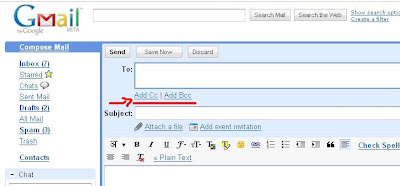
Some email programs do not have the BCC listed, in that case, look for link or button that says ADD BCC.


Good..play safe!:) Read more Entry>>
So, maintain caution ,play safe ,protect your id from falling into the hands of spammers!
Just follow these two simple tips:
- Use BCC (Blind Carbon Copy) to type in the multiple recipients email addresses that you plan to forward . By this, none of the email addresses will show in the forwarded emails.
- This is also a politeness to the people you are forwarding to, as they do not have to scroll through pages of email addresses to get to the joke that you thought was so very funny ,so as to forward it
That’s it! So very simple!


Good..play safe!:) Read more Entry>>
Tuesday, May 26, 2009
Restore accidentally deleted files
Gosh! Did you accidentally delete files from your computer? Or maybe it was deleted by bugs, crashes and viruses ? Did you by any chance empty the recycle bin ? No worries! All these files can be recovered by a freeware data recovery program called Recuva , pronounced ‘recover’ You can download it from here -http://www.recuva.com/
Another very important feature of this software is that it has a secure deletion option that allows you to permanently delete files that were found during the scan, so that future recoveries are not possible.
You definitely do need this freeware!

 Read more Entry>>
Another very important feature of this software is that it has a secure deletion option that allows you to permanently delete files that were found during the scan, so that future recoveries are not possible.
You definitely do need this freeware!

 Read more Entry>>
Monday, May 25, 2009
Smart Installer Pack
Bought a new computer? Or maybe just formatted your computer? Cool .Now you have to download or reinstall all your fav applications ! Well, it is indeed tiresome to hunt all over the net for your applications. No worries! I came across a free software pack which contains all the necessary applications bundled in one package. You can download them all at one shot and after that you can install then one by one. Above all it’s totally free! It's easy to use and the installer comes in a convenient executable file.
You can decide what software to install.
The following softwares are included in the pack:
Yahoo Messenger, Yahoo Widgets, Skype, Google Earth, Winamp, Firefox, Bittorent, Gmail Notifier, Rocket Dock, Codecs Pack, Adobe Flash Player,Apple QuickTime, SunJava, Adobe Reader, WinRar, Open Office, Daemon Tools, ThunderBird, Gimp, Picasa, Avira Antivirus, Google Chrome, CCleaner and KmPlayer.
Well..awesome.Save time, just download this Smart Installer Pack and click on the preferred icons !You're done! That's it!
You can download the pack from here -
 Read more Entry>>
You can decide what software to install.
The following softwares are included in the pack:
Yahoo Messenger, Yahoo Widgets, Skype, Google Earth, Winamp, Firefox, Bittorent, Gmail Notifier, Rocket Dock, Codecs Pack, Adobe Flash Player,Apple QuickTime, SunJava, Adobe Reader, WinRar, Open Office, Daemon Tools, ThunderBird, Gimp, Picasa, Avira Antivirus, Google Chrome, CCleaner and KmPlayer.
Well..awesome.Save time, just download this Smart Installer Pack and click on the preferred icons !You're done! That's it!
You can download the pack from here -
http://www.smartinstallerpack.com/
 Read more Entry>>
Subscribe to:
Posts (Atom)


